Focus To-Do: Pomodoro & Tasks

Focus To-Do: Pomodoro & Tasks
Category
Productivity
| Technical Specification | Download | |
|---|---|---|
| Latest Updated | ||
| Latest Version | ||
| Developer | ||
| Operating system | Android, iOS | |
| Language | English | |
| Price | Free | |
| Available version | ||
- Focus To-Do: Pomodoro & Tasks is an innovative application designed to enhance productivity through effective time management. It combines the popular Pomodoro Technique with intelligent task organization, allowing users to break work into manageable intervals while minimizing distractions. Users can easily create to-do lists, set timers, and track their progress, fostering a structured work environment. By promoting focused work sessions and periodic breaks, this app empowers individuals to maximize their efficiency and achieve their goals with ease.
More Details
- Below are some of the notable features of the Focus To-Do app:
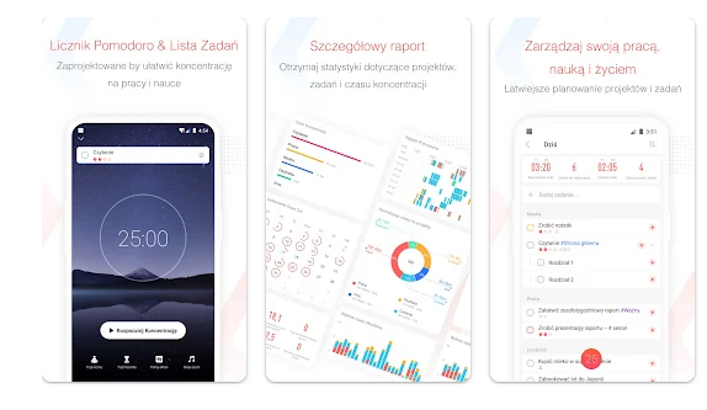
- Pomodoro Timer Integration: The app incorporates a Pomodoro Technique timer that enables users to break work into intervals, traditionally 25 minutes in length, separated by short breaks. This functionality helps enhance concentration and mitigate burnout by fostering regular mental rest periods, ultimately promoting sustained productivity.
- Task Management System: With a robust task management framework, users can create, categorize, prioritize, and track their tasks efficiently. The system supports nested subtasks and customizable tags, which allows for hierarchical organization and improved clarity in task execution, catering to varying project complexities.
- Analytics and Progress Tracking: The app features an advanced analytics dashboard that provides users with insights into their productivity patterns over time. By utilizing data visualization techniques, it summarizes completed tasks, time spent on activities, and focus streaks, enabling users to identify their strengths and areas for improvement in their work habits.
- Cross-Platform Synchronization: Focus To-Do offers seamless cloud synchronization across devices, ensuring that users have access to their tasks and Pomodoro sessions from any platform—be it mobile, tablet, or desktop. This feature leverages modern API protocols for real-time data sync, enhancing user accessibility and continuity of workflow irrespective of the device used.
Extra Details
- How to uninstall the Focus To-Do: Pomodoro & Tasks? You can uninstall Focus To-Do: Pomodoro & Tasks on your mobile device by following these steps: Locate setting icon on your phone. Tap Application manager or Apps Touch Focus To-Do: Pomodoro & Tasks. Press uninstall.
How to install the application
How to download and install Focus To-Do: Pomodoro & Tasks on your mobile device?
To install the app from Google Play, follow these steps:
- Open the Google Play Store on your Android device.
- Type Focus To-Do: Pomodoro & Tasks in the search bar.
- Select the most relevant result from the list.
- Tap the "Install" button to start downloading.
- Wait for the installation to complete.
DISCLAIMER
- The above app is a mobile app that will not change any system settings on your phone
- All apk files downloaded from our site are secure
- We provide the official download link from Google Play Store
- The trademarks and logos of all the merchants displayed on the website are the property of their respective owners. The website is not affiliated or associated with any of them
- Our website and its content strictly comply with all the terms and conditions of Google Ads Advertising policies and Google Unwanted Software policy
Steps to Uninstall android App
How to uninstall Focus To-Do: Pomodoro & Tasks?
To remove the app from your phone, follow these steps:
- Open the settings on your device.
- Go to the “Apps” or “Application Manager” section.
- Find and select "Focus To-Do: Pomodoro & Tasks" from the list.
- Tap the "Uninstall" button to delete the app from your device.
Steps to Uninstall App on Apple devices
To remove Focus To-Do: Pomodoro & Tasks from your iOS device, follow these instructions:?
- Navigate to your Home Screen or App Library and find the Focus To-Do: Pomodoro & Tasks icon.
- Tap and hold the icon until a menu appears.
- Choose the option labeled Remove App.
- Confirm the removal by selecting Delete App.
- Finish by tapping Done or pressing the Home button.
Tips & Tricks
- Utilize the Pomodoro timer feature to enhance focus by breaking work into manageable intervals. Commit to 25 minutes of concentrated effort followed by a 5-minute break, which can improve productivity and reduce burnout.
- Leverage task prioritization tools within the app to organize your workload effectively. By labeling tasks based on urgency and importance, you can ensure that your time is spent on activities that contribute most to your goals.
- Sync your tasks across devices to ensure you can access your to-do list anytime, anywhere. This feature allows for seamless transitions between work and personal environments, ensuring that no task is overlooked.
- Use the progress tracking functionality to visualize your accomplishments over time. By reviewing your completed tasks, you can celebrate small victories and stay motivated to tackle larger goals.
- Customize notifications to remind you of upcoming tasks or breaks. Personalizing these alerts can help maintain your schedule and ensure you stay on track throughout your day.
Popular APKs See more

Canon Camera Connect
3.1.20.57 for Android

Weathernews
5.41.1 for Android

Google Play Movies TV
4.39.1826.608511106.1-release for Android

ALDI Nord
4.17.2 for Android

metronome
1.8.0 for Android

bubble level
4.8-release for Android
Top APKs See more

ksdenki
1.12.0 for Android

Target
2024.12.2 for Android

GasBuddy
700.97.23138 for Android

aeon mall
5.6.1 for Android

Expedia App
2024.14.0 for Android

rakuten
6.34.0 for Android
Top New Social Apps See more

PhotoRoom
4.9.2 for Android

memo
5.0 for Android

Panda Pop
13.1.015 for Android

McDonald's Japan
5.3.80(953) for Android

Wombo Make your selfies sing
3.1.1 for Android

Irs2go
5.6.2 for Android